Turning a Riverside podcast episode into a full content pack with a Claude Code skill
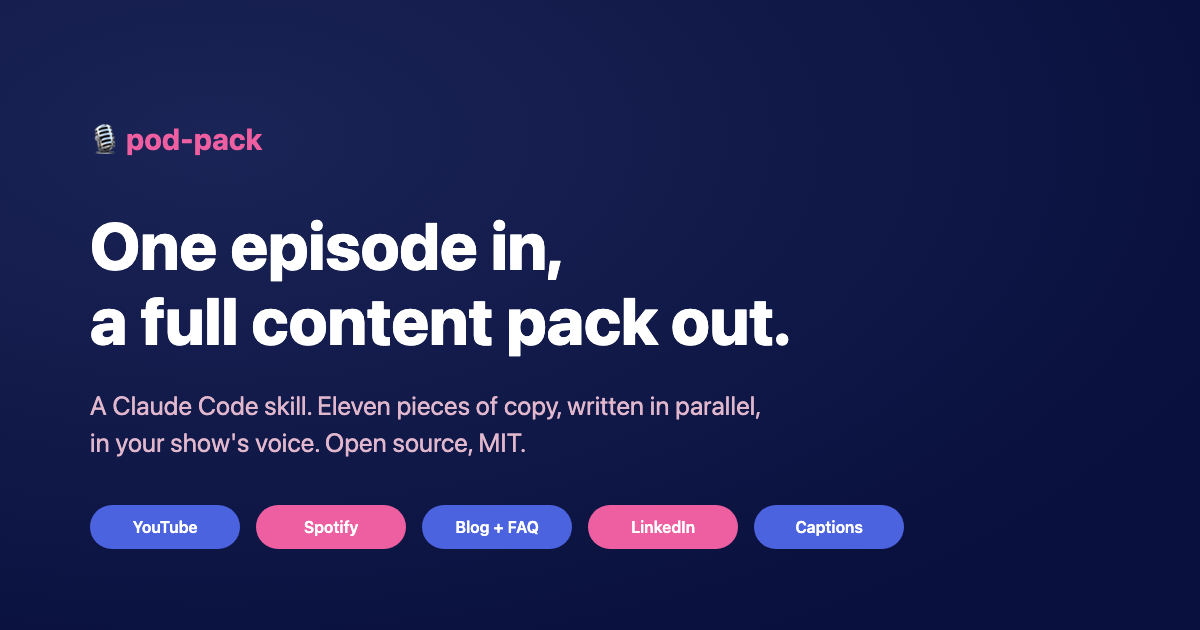
pod-pack is a free, open source Claude Code skill that turns one Riverside podcast episode into a full, publish-ready content pack. You point the Claude Code skill at a finished episode and it produces the YouTube title, description, and tags; the Spotify description; a blog post; and social posts for LinkedIn, Instagram, TikTok, and a YouTube community post, plus cleaned-up captions, all in your show's voice. It is built around Riverside, the browser-based video editor I record and edit in. The copy is written by a fleet of background agents working in parallel, so eleven pieces get drafted at once instead of one after another.
I built it around my own workflow: I record and edit in Riverside, a browser-based video editor, and the editing help is designed for exactly that kind of web editor. The code is open at github.com/gigikenneth/pod-pack under an MIT license. This is the story of what it does and how it works.
The problem it solves
Recording an episode is the easy part. What eats the afternoon is everything after: writing a title that fits in 100 characters, a description with timestamps, tags that help discovery, a Spotify blurb, a blog post, and then four or five social posts that each sound right for their platform. Do that every week and it becomes a grind, and the grind is where voice drifts into generic AI slop.
I wanted the tedious repurposing done in one pass, in my voice, without me babysitting eleven separate prompts. pod-pack is that pass.
The four phases
Give it a recorded episode and it walks four phases. You can run all four, or just the one you need.
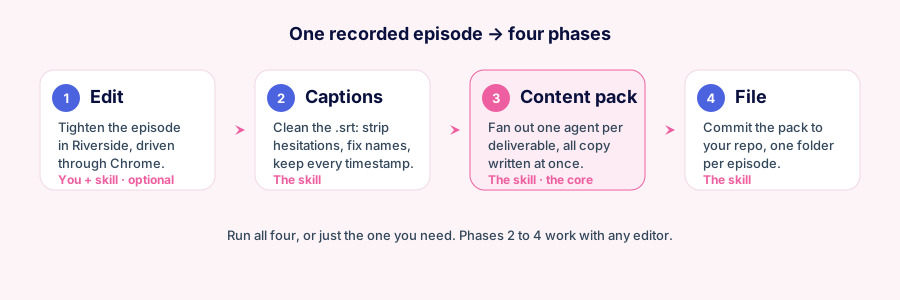
- Edit (optional, browser editors only). It tightens the episode inside Riverside's web transcript editor, driven through Chrome, cutting tangents and production artifacts by clicking words in the on-screen transcript. The editing help is built specifically for browser-based video editors like Riverside, which is what I record and edit in, so it knows that editor in detail. It does not work with desktop apps like Premiere or Descript desktop.
- Captions. It cleans the exported
.srt: strips hesitation markers, fixes mis-heard names, brands, and jargon, and keeps every timestamp intact. - Content pack. This is the core. It spawns one agent per deliverable and writes all the copy at once.
- File. It commits the whole pack to your content repo, one folder per episode, so past episodes are easy to diff.
Phases 2 to 4 are editor-agnostic, so they work with any transcript and any .srt, browser or desktop.
How the content pack works: fan out, don't queue
The interesting part is phase 3. Most tools would generate each piece in sequence: title, then description, then the blog post, and so on down the line. pod-pack does not queue. It reads your show profile and the clean transcript once, then spawns one background agent per deliverable in the same turn. Every agent runs concurrently, and every one is handed the same voice rules and guest-framing rules so the whole pack sounds like one show, not eleven prompts.
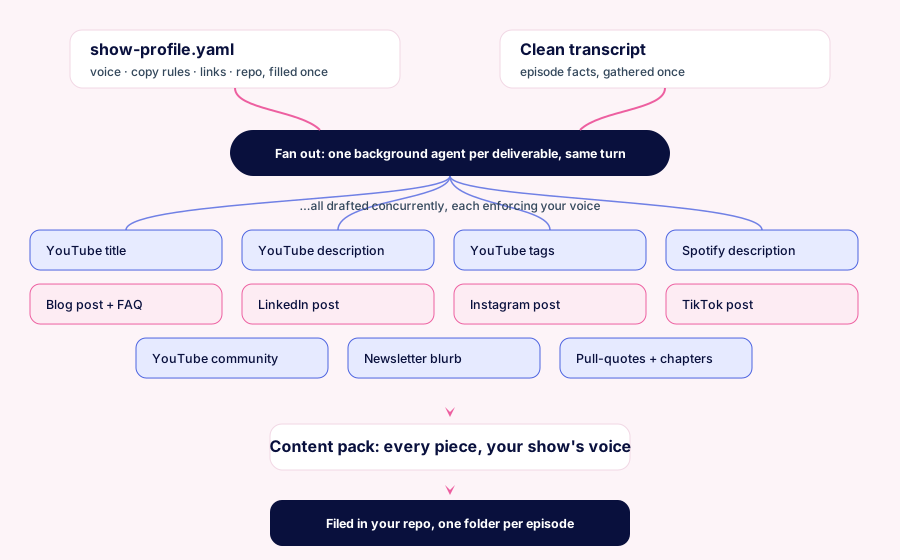
The result is a full pack from one clean transcript: YouTube title options with character counts, a templated YouTube description, tags ordered highest-value first, a Spotify-safe description, a Markdown blog post with an FAQ for answer engines, LinkedIn, Instagram, and TikTok posts, a YouTube community post, a newsletter blurb, pull-quotes for quote cards, and chapter timestamps. Every text piece is written for SEO, answer engines, and generative engines, so it is citable and entity-rich rather than vague.
Nothing is hardcoded to my show
Nothing about the skill is tied to any one podcast. All the show-specific facts, the name, host, links, voice rules, and the repo where packs get filed, live in a single show-profile.yaml you fill in once. Leave a field blank and that deliverable is skipped. There is no code to touch. That is the whole configuration, which is why the same skill works for your show as well as mine.
The caption fixer, standalone
The caption cleaner is a small dependency-free Python script, and it is useful even outside Claude Code. It strips ~ hesitation markers and applies a JSON correction map, preserving every cue number and timestamp, even when a corrected phrase spans two caption lines inside one cue.
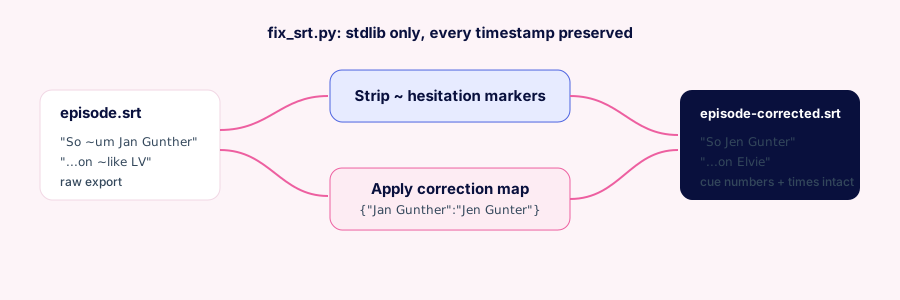
python3 skill/scripts/fix_srt.py episode.srt --map corrections.json
# writes episode-corrected.srt
The map is just {"phrase heard wrong": "correct phrase"}, with short tokens that must not match inside other words tucked under a __word_boundary__ key. Run it with no map to only strip the markers.
It never fabricates
A repurposing tool that fabricates is worse than no tool. pod-pack flags uncertain guest and brand spellings and legal-risk claims instead of guessing, and it never invents a quote. It also refuses to do the billed or irreversible steps, the Riverside export, publishing, or opening a pull request, without asking you first. You still make the calls on the final title and anything with reputation weight.
Try it
pod-pack is open source and free. Clone it, drop the skill folder into your Claude Code skills directory, fill in one YAML file, and point it at your next episode.
- Repo: github.com/gigikenneth/pod-pack
- License: MIT
FAQ
What is pod-pack? pod-pack is a free, open source Claude Code skill that turns one recorded podcast episode into a full content pack: YouTube title, description and tags, a Spotify description, a blog post, and social posts for LinkedIn, Instagram, TikTok, and YouTube, plus cleaned-up captions. The copy is written by parallel AI agents in your show's voice.
How does pod-pack write everything at once? It spawns one background agent per deliverable in the same turn, so all the copy is drafted concurrently instead of one piece after another. Every agent reads the same show profile, so the whole pack shares one voice.
Is pod-pack tied to a specific podcast? No. All show-specific facts, the name, host, voice rules, links, and the repo where packs are filed, live in a single show-profile.yaml you fill in once. The same skill works for any show.
Is pod-pack free and open source? Yes. pod-pack is on GitHub under an MIT license. You can read it, fork it, and adapt it to your show for free.
What do I need to run pod-pack? Claude Code, and python3 for the standalone caption fixer. The optional editing phase also needs a browser-based transcript editor like Riverside open in Chrome with the Claude in Chrome tools. Phases 2 to 4 work with any editor.
Can I use the caption fixer on its own? Yes. fix_srt.py is a dependency-free Python script that strips hesitation markers and applies a JSON correction map while preserving every cue number and timestamp, so it is useful even outside Claude Code.