AI and Git Words Explained for Marketers
A plain-words glossary for marketers who have never opened a terminal. What an agent is, what Markdown is, what a pull request does, and every other word you'll meet when you start working with Claude and GitHub.
When I started working with AI tools and code, I had to look up nearly every word on this page. It took me a while to understand what a pull request was, and longer to stop nodding along when someone said "just clone the repo".
So this is the glossary I wish I'd had. It goes with a four-part series: Git and GitHub from zero, context engineering, every way to use Claude and connecting GitHub to Claude. Keep it open in another tab and come back whenever a word trips you up.
Search for a word below, or scroll for the full list.
AI basics
AI model, or LLM
An AI model is the software that reads your words and writes words back. LLM stands for large language model, the kind of model that learned language by studying a huge amount of text. Think of it as an engine: the apps you use are the car built around it.
Claude
Claude is the family of AI models made by Anthropic, and also the name of the apps you use to talk to those models. When people say "ask Claude", they usually mean the chat app at claude.ai.
Prompt
A prompt is whatever you send the AI: a question, an instruction, a brief, a pasted document. A good prompt reads like a good creative brief. It says who the audience is, what you want and what good looks like.
Response, or output
The response is what the AI sends back. Output means the same thing, and is often used for files or finished work rather than chat replies.
Hallucination
A hallucination is when the AI states something false with full confidence, like a made-up statistic or a source that doesn't exist. It isn't lying on purpose. It's predicting words that sound right. Always check facts, numbers and links before anything goes out.
Chatbot vs agent
A chatbot replies to you. An agent can take steps and use tools to finish a task: open files, search the web, run commands, edit a document, then check its own work. A chatbot is a colleague who answers your question. An agent is a colleague you can hand a whole task to. If you're giving agents access to your inbox or accounts, read AI agent safety for marketers first.
Agentic workflow
An agentic workflow is a process where an agent does several steps in a row with little hand-holding. For example: read last month's blog posts, pull the top performers from analytics, draft three social posts for each, and save them in a folder for review.
Token
A token is a small chunk of text, often part of a word. AI models read and write in tokens, and usage is counted in tokens. Roughly, a token is about three quarters of an English word. You'll meet it in Part 4, where I cover how not to burn through them.
Context
Context is everything the AI can see while it works on your request: your prompt, the conversation so far, any files you shared and any instructions running in the background. The AI only knows what's in its context. If your brand voice guide isn't in there, it's guessing.
Context window
The context window is the limit on how much the AI can hold in mind at once, measured in tokens. Picture a desk. You can spread a lot of papers on it, but once it's full, older papers start falling off the edge. Current Claude models have a context window of up to 1 million tokens, which is a very big desk, though a cluttered desk still makes for worse work.
Context engineering
Context engineering is the practice of setting up what the AI sees so it does good work without you repeating yourself. It means writing down your brand voice, your audience and your processes in files the AI reads automatically. This is the whole of Part 2.
Model tiers: Haiku, Sonnet, Opus and Fable
Claude comes in different sizes. In the current lineup, Haiku is the fastest and lightest, Sonnet balances speed and intelligence, Opus is the strong all-rounder for longer work, and Fable is for the hardest, longest tasks. Bigger models think more carefully but take longer and use more of your allowance. A quick caption rewrite doesn't need the biggest model.
Usage limits
Every Claude plan has a cap on how much you can use it in a given period. Long conversations, big files and bigger models all use more. When you hit the limit, you wait for it to reset or move to a higher plan.
Files and formats
File
A file is a single saved thing on your computer: a document, an image, a spreadsheet. Everything Claude Code works with is a file.
Folder, or directory
A folder holds files and other folders. Directory is the more technical word for the same thing. You'll hear both.
File extension
The extension is the bit after the dot in a file name, like .docx, .jpg or .md. It tells your computer, and the AI, what kind of file it is.
Plain text
Plain text is text with no hidden formatting: just the characters themselves. A Word document stores fonts, colours and layout alongside your words. A plain text file stores only the words. AI tools love plain text because there's nothing extra to wade through.
Markdown
Markdown is a simple way to add formatting to plain text using ordinary symbols. A # makes a heading, asterisks make bold, a dash starts a bullet point. It reads fine as raw text and looks tidy once displayed.
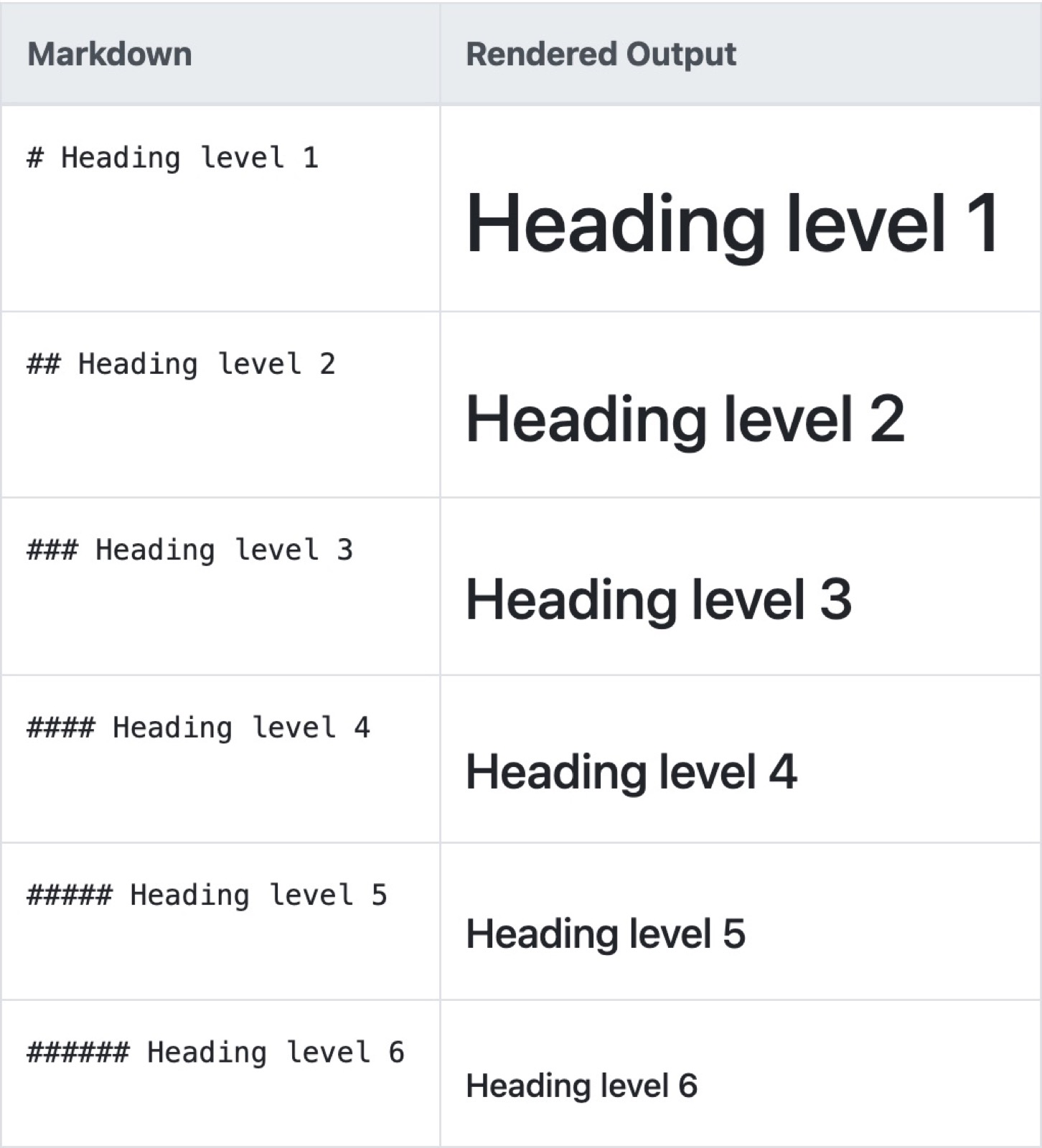
# Brand voice

Our tone is **warm and direct**.

- Short sentences
- British English
- Plenty of examples
.md
.md is the file extension for Markdown files. Most of the instruction files you'll write for Claude, including CLAUDE.md, end in .md.
JSON
JSON is a way of storing structured information as labels and values, so software (and AI) can read it reliably. It looks fussy with all its brackets and quotation marks, but it's just a very strict list.
{
  "campaign": "Spring launch",
  "channel": "LinkedIn",
  "budget": 2000
}
You'll meet it in Part 2, where a JSON index helps the AI find the right files.
YAML
YAML is another way of storing structured information, a bit friendlier to read than JSON because it uses indentation instead of brackets. The block of settings at the top of many blog posts and skill files is usually YAML.
CSV
CSV stands for comma-separated values. It's a spreadsheet saved as plain text, with each row on its own line and commas between the columns. Most tools can export to CSV, and AI reads it easily.
PDF vs Markdown for AI
PDFs are built to look the same everywhere, which is great for printing and awkward for AI. Text can come out jumbled, tables can break and every page uses more tokens. If you want Claude to use a document again and again, a Markdown version is cleaner and cheaper.
.env file and API key
An API key is a password that lets software use a service on your behalf, such as your email tool or ad platform. A .env file is where developers keep keys like these on their own computer. Treat both like your bank PIN: never paste them into a chat, a document or a public repository.
Computer basics
Terminal, or command line
The terminal is an app where you type instructions to your computer instead of clicking. On a Mac it's called Terminal. On Windows you'll use PowerShell or Windows Terminal. It looks intimidating, but it's just a text box that does what you tell it.
Command
A command is one instruction you type into the terminal, then press Enter to run.
CLI
CLI stands for command line interface: a tool you use by typing commands rather than clicking buttons. Claude Code started as a CLI, which is why people talk about "running Claude in the terminal".
Path
A path is the address of a file or folder on your computer, like /Users/gigi/Documents/blog. Each slash is a step into another folder.
cd
cd means change directory. It moves you into a folder, the way double-clicking a folder does. cd Documents takes you into your Documents folder.
ls
ls lists what's in the folder you're in. On Windows, dir does the same job. It's the terminal version of opening a folder and looking.
Install
Installing means putting a piece of software on your computer so you can use it. In the terminal, you install tools by typing a command you copy from the tool's official website. Only ever copy install commands from the official site.
App vs CLI vs web app
An app is software you download and click around in. A CLI is software you type commands into. A web app runs in your browser, so there's nothing to install: claude.ai is a web app. Many tools, Claude included, come in all three forms.
Browser extension
A browser extension is a small add-on that gives your browser extra powers, like a password manager or a grammar checker. Claude in Chrome is one.
Git and GitHub
Git
Git is a tool that tracks every change to a set of files, so you can see who changed what and go back to any earlier version. Think of it as version history for a whole folder, with labels you write yourself. Part 1 starts here.
GitHub
GitHub is a website that stores Git projects online, so you can back them up, share them and work on them with other people (and with AI). Git is the tool, GitHub is the place.
Repository, or repo
A repository is a project folder that Git is tracking, including its full history. Your blog drafts, brand guidelines and Claude instructions could all live in one repo.
Clone
Cloning means downloading a full copy of a repository from GitHub to your computer, history and all.
Commit
A commit is a saved snapshot of your changes, with a short note saying what you did, like "Add Q3 campaign brief". It's a save point you can always return to.
Branch
A branch is a separate copy of your project where you can try changes without touching the main version. It's like duplicating a Google Doc to draft edits, except Git can merge your edits back in neatly afterwards.
Pull request
A pull request, often shortened to PR, is a request to bring the changes from your branch into the main version. It shows exactly what changed and gives people a place to comment and approve before anything goes live. It works like sending a draft for sign-off.
Merge
Merging is combining the changes from one branch into another. When a pull request is approved, you merge it, and the main version now includes the changes.
Push
Pushing sends your commits from your computer up to GitHub.
Pull
Pulling brings the latest changes from GitHub down to your computer. Push is upload, pull is download.
Diff
A diff shows the difference between two versions of a file: what was added, removed or changed, usually in green and red. It's track changes for code and text.
README
A README is the welcome file in a repository, usually README.md. It explains what the project is and how to use it. GitHub shows it on the project's front page.
.gitignore
A .gitignore file lists files Git should never track or upload, such as your .env file with its secret keys. It's your "do not pack" list.
Public vs private
A public repository can be seen by anyone on the internet. A private one is visible only to you and the people you invite. Keep anything with client details, internal plans or keys private.
Fork
A fork is your own copy of someone else's repository on GitHub. You can change it freely without affecting the original. It's how people build on shared templates and open-source tools.
Claude-specific words
claude.ai
claude.ai is the website where you chat with Claude. There are desktop and mobile apps too. This is where most people start, and it's covered in Part 3.
Projects
Projects are workspaces inside claude.ai where you can upload files and write standing instructions that apply to every chat in that project. A project for your brand, say, could hold your voice guide and audience notes, so you don't paste them in each time.
Cowork
Cowork is the agent version of Claude in the desktop app, with no terminal needed. You give it a task and it works through the steps on its own, using files on your computer and the tools you've connected. It also runs in the Chrome side panel.
Claude Code
Claude Code is Claude as an agent that works directly in your files and folders. It was built for coding, but it's just as good at managing content, research and documents. You can use it in the terminal or in the desktop app. Part 3 compares the two.
Claude Design
Claude Design lets you make designs, prototypes, slides and one-pagers by chatting with Claude, then refine them with comments or direct edits. You can export the result to formats like PDF or PowerPoint.
Claude in Chrome
Claude in Chrome is a browser extension that lets Claude read and act on web pages for you: navigating, clicking and filling in forms. Anthropic advises keeping it away from sensitive sites, like banking.
Scheduled tasks (formerly routines)
A scheduled task is a task Claude runs on a schedule without you starting it, like a Monday morning summary of last week's content performance. Older articles call these routines.
CLAUDE.md
CLAUDE.md is a Markdown file that Claude Code reads automatically at the start of every session. It's where you write the standing instructions: who you are, how you write, what to never do. Think of it as the onboarding doc for a new hire who reads it every morning. It's central to Part 2.
Skill
A skill is a packaged set of instructions (and sometimes files) that teaches Claude how to do one specific job, like writing a LinkedIn carousel or producing a podcast content pack. Claude loads it only when the job comes up, which saves tokens. More in Part 4.
Plugin
A plugin is a bundle you install to add several things to Claude Code at once, such as skills, commands and connectors. A skill is one recipe, a plugin is the whole cookbook.
MCP, or connector
MCP stands for Model Context Protocol, an open standard for connecting AI to other tools and data, like Gmail, Google Drive, Notion or GitHub. In claude.ai these are called connectors. Think of MCP as a universal plug adapter: one shape that lets Claude plug into many services. Part 4 covers connecting GitHub this way.
Subagent
A subagent is a helper agent that Claude sends off to do one part of a bigger task, then report back. It's like a lead handing research to an assistant so the lead's own desk stays clear. Subagents keep the main conversation's context window tidy.
Permission prompt
A permission prompt is Claude Code stopping to ask before it does something, like editing a file, running a command or using a connector. You can choose what it may do without asking. Read these prompts properly rather than clicking yes on reflex.
Slash command
A slash command is a shortcut you type starting with /, like /help or /clear, to tell Claude Code to do something specific. Skills can be run as slash commands too.
Where to start
You don't need to learn all of these at once. Most of them will make sense the first time you use them, and you can always come back here.
If you're starting from zero, begin with Part 1: Git and GitHub for marketers. It walks through repositories, commits, branches and pull requests step by step, and by the end, half the words on this page will feel familiar.
Photos on Unsplash: cover by Mick Haupt. Screenshots are my own, taken from Markdown Guide in November 2026.