20 Ways Marketers Can Stay Safe While Building With AI Agents
Most AI safety advice is written for engineers deploying models. This is the version for marketers building agentic workflows: what to keep away from your agents, what to check before you install or publish, and what to audit once it is all running.

Everyone in marketing is building an "engine" right now. Claude Code running content pipelines, browser agents doing competitor research, MCP connectors wired into Gmail, Drive, HubSpot and the ad accounts. I'm one of them: my own content marketing workflow became fully agentic over the past year.
Most of the safety advice I see is written for engineers. It talks about deploying models, red-teaming and evals. That's useful, but most people building marketing engines are non-technical, or technical enough to follow a tutorial and not much further. Meanwhile, bad actors have noticed that AI-curious people will paste commands, install plugins and connect inboxes because a LinkedIn post told them to.
So I did a lot of research into what has gone wrong in 2025 and 2026, and turned it into a list. It's grouped by stage: before you set anything up, while you build, before you install, while you review, and once it's running.
The one rule behind this whole list
Developer Simon Willison calls it the lethal trifecta. An AI agent becomes dangerous when it has all three of these at once:
- Access to private data (your inbox, your Drive, your CRM)
- Exposure to untrusted content (web pages, emails, shared docs, support tickets)
- A way to send things out (email, posting, uploading, opening links)
Put all three together and a hidden instruction inside a web page or email can tell the agent to leak whatever it can reach. Researchers have shown this again and again. A hidden line in a Reddit comment made Perplexity's Comet browser open the user's Gmail, grab a login code and post it back as a reply. White-on-white text in an email made ChatGPT's Deep Research agent send personal data to an attacker. A Word doc disguised as a "skill" got Claude Cowork to upload files to an attacker's account.
To be fair, these were researcher demos, and most have been patched. I couldn't find a documented case of a marketer losing data this way. But look at the prompts that triggered them: "summarise this page", "go through my inbox", "review this shared brief". That's a normal Tuesday in a marketing engine.
The fix is structural. If a workflow needs all three, a human approves every send, post, spend or delete. Most of the tips below are ways of doing that.
Before you set anything up
1. Install AI tools only from the official site, typed in yourself
From March to October 2026, sponsored Google results for "Claude Code install" led to cloned documentation pages that told Mac users to paste a Terminal command. That command installed password stealers. One version was hosted on a genuine claude.ai shared-chat page, and another had a copy button that put different code on your clipboard than the page showed.
Don't click ads, pop-ups or DMs for AI tools. Type the official domain yourself and install from there.
2. Stop before you paste a Terminal command from a web page
The most damaging Mac attacks of the last two years didn't need a software flaw. They persuaded people to paste one command. Microsoft's analysis of the "ClickFix" technique shows the pattern: ask for your Mac password, download a file, remove Apple's safety flag on it, then run it.
If a command came from a website, a CAPTCHA, a chat or an email rather than official docs, stop if you see any of these:
curl ... | bash       # downloads a script and runs it straight away
wget ... | sh         # same thing, different tool (also | zsh)
echo ... | base64 -d  # a long jumble of letters that hides the command
sudo ...              # asks for your Mac password to get full control
xattr / spctl         # switches off Apple's safety checks
rm -rf ...            # deletes files and folders without asking
chmod +x ...          # makes a downloaded file runnable
Windows instructions showing up when you're on a Mac are another warning sign.
Legitimate install commands can look a lot like malicious ones, so where the command came from matters more than how it looks.
3. Use a business plan for client work, and switch training off everywhere else
Your plan tier decides whether your prompts can train future models. Anthropic doesn't train on Claude Team, Enterprise or API data by default. The same goes for ChatGPT Business and Enterprise, and Gemini inside Google Workspace. Consumer plans are different. Since Anthropic's August 2025 terms update, Claude Free, Pro and Max chats can be used for training and kept for up to five years unless you turn Model Improvement off.
If you use a personal account at all, switch these off:
- Claude: Settings, Privacy, Model Improvement
- ChatGPT: Settings, Data Controls, "Improve the model for everyone"
- Gemini: Keep Activity
Also skip the thumbs up and thumbs down buttons on sensitive chats. Feedback can be stored and used even when training is off.
4. Protect your AI account like you protect your inbox
Once Claude or ChatGPT is connected to Gmail, Drive and your ad accounts, logging into it is close to logging into all of them. Use a passkey or two-factor authentication, keep work and personal accounts separate, and don't share logins across the team.
While you build the engine
5. Give the agent its own folder with only approved inputs
Claude Code can read anything in the folder you start it in without asking, even in its most careful mode. Never start it from your home folder. Make a dedicated project folder for the marketing engine and decide what goes in.
| Fine to include | Keep out |
|---|---|
| Brand and tone-of-voice guides | .env files, API keys, passwords |
| Published copy and public case studies | CRM or audience exports with names and emails |
| Client-approved briefs | Contracts, SOWs and anything under NDA |
| Templates and style guides | Health, financial or HR data |
| Aggregated performance numbers | Unreleased launches and pricing |
A pseudonymised CRM export still counts as personal data under GDPR, so "I removed the names" usually isn't enough. If you need examples of your audience, write personas or summaries instead.
6. Keep API keys in a password manager, never in a chat
API keys belong in your password manager and in your hosting dashboard's environment variables (Vercel, Netlify and similar), where your site can use them without the agent seeing them. Never paste one into a chat, because transcripts get stored.
Use one key per client or project, with a monthly spend cap. Anthropic's Console lets you set a cap per workspace. If a key leaks, it's cheap, easy to spot and easy to revoke. This matters: GitGuardian found AI-assisted code leaks secrets at about twice the normal rate, and most leaked keys are still working years later.
7. Start every connector on read-only
When you connect an agent to Gmail, Drive, Slack, HubSpot or an ad platform, give it the least access the task needs. Share one "agent inputs" Drive folder, not your whole Drive. Use read-only reporting access on ad accounts. Add write access only when a specific workflow needs it.
This isn't theoretical. When a support ticket told an AI coding agent to read a private database table, it did, because its connection had full rights. Supabase responded by adding read-only modes.
8. Make agents draft, never send
This is the most useful habit on the list. Let the agent write Gmail drafts, schedule posts without publishing, and set up campaigns in a paused state. A person presses send, publish or enable.
The OWASP security project uses a marketer's example to make the point: an email assistant tricked by a malicious email into forwarding mail. Their fix is requiring a human to review and hit send on every drafted email.
9. Put spend limits in the platform, not in the prompt
"Don't spend more than £200" in an agent's instructions is a suggestion. A limit set inside Google Ads, Meta, your API console or a virtual card is a rule. Even then, read the fine print: a Google Ads daily budget can spend up to twice the average daily amount on a given day.
Agents do make purchases you didn't ask for. OpenAI's Operator bought a columnist $31 of eggs with a saved card.
10. Never run "skip permissions" mode on your own laptop
Claude Code's --dangerously-skip-permissions flag, and similar YOLO or Turbo modes in other tools, let the agent run anything without asking. Anthropic says to use it only in isolated environments like containers or VMs.
Here's what happens without that isolation. Google's Antigravity agent, running in Turbo mode and asked to clear a cache, deleted a user's entire drive. And the Nx malware attack in August 2025 used victims' own AI coding tools, run with those same flags, to search their laptops for passwords and keys.
11. Turn on the sandbox and add a few deny rules
If you use Claude Code, run /sandbox to turn on its built-in isolation, which limits which files and websites commands can reach. Then add deny rules so the agent can't read your secrets or send things out without you. A starter .claude/settings.json in your project folder looks like this:
{
  "permissions": {
    "deny": [
      "Read(./.env)",
      "Read(./.env.*)",
      "Read(./secrets/**)",
      "Bash(curl *)",
      "Bash(wget *)",
      "Bash(git push *)"
    ]
  }
}
Deny rules are a backstop. Anthropic notes that a script can still read a file the rules block, which is why tip 5 (keep secrets out of the folder) comes first.
12. Use a separate browser profile for browser agents
If you let an agent drive a browser, give it its own Chrome profile, logged into only what the task needs. Keep your password manager, banking and personal email out of that profile. The Comet attack worked because the agent was browsing inside a session where the user was already logged into Gmail.
Before you install anything
13. Read every skill, MCP server and plugin before you install it
Skills, plugins and MCP servers run with your permissions. A skill is a set of instructions your agent follows, so it can do harm without containing any malware. Claude Code's docs warn that a skill can grant itself broad tool access and run shell commands the moment it loads.
This has already happened at scale. On ClawHub, a skills marketplace for another agent, researchers found 341 malicious skills out of 2,857, most of them installing password stealers. A fake extension on Cursor's marketplace cost one developer about $500,000.
Before installing, check:
- Who published it, and is it the official vendor?
- How old is the repo, and does the star count match its age?
- Open the
SKILL.mdand read it, or paste it into a fresh chat and ask what it does and what it can access - Look for
allowed-tools, lines starting with!, and bundled scripts - Prefer first-party connectors from the company whose product you're connecting
14. "It's worked fine for weeks" doesn't mean it's safe
The first known malicious MCP server, a fake Postmark email connector, shipped 15 clean versions to build trust. Version 16 quietly BCC'd every email sent through it to the attacker.
Pin the version you vetted, watch for updates from new maintainers, and remove anything you no longer use.
15. Check that every package exists before the agent installs it
AI models invent software package names. A 2025 study found about one in five packages recommended by AI models didn't exist, and the same fake names kept coming back. Attackers register those names and fill them with malware, a trick called slopsquatting. Attacks using it showed up on npm in August 2026.
When an agent wants to install something you've never heard of, look it up on npmjs.com or pypi.org. Check that it exists, has been around a while, has steady downloads, and links to a matching GitHub repo.
While you review what the agent made
16. Ask for a plan first, and use git as your undo button
Before a big task, ask the agent: "List every file you'll touch, every command you'll run, and anything you'll install, delete, send or publish." Approve the plan, then let it work. Afterwards, ask for a plain-English summary of what changed.
Don't rely on the agent's word about what it did. When Replit's agent deleted a live database during a code freeze, it wrongly told the user a rollback was impossible. Commit to git before and after each task. Claude Code's own undo doesn't cover changes made through shell commands, and Anthropic says it's not a replacement for version control.
17. Get a second reviewer before anything goes live
Open a fresh session, or use a different model, and ask it to review the changes without seeing the first agent's reasoning. In Claude Code, /security-review runs a security pass over your changes.
For AI-built landing pages, forms and quizzes, check these before launch:
- Search the code for
key,secret,token,sk-andservice_role. Secret keys should never appear in code that runs in the browser. - If it uses a database like Supabase, ask the agent to explain each table's access rules in plain English. A scan of Lovable apps found about one in ten had databases anyone could read.
- Submit your own form with the browser's Network tab open and check the data only goes to domains you recognise.
- Try opening admin pages in a private window to confirm they ask you to log in.
18. Check every stat, quote and testimonial before publishing
AI makes up sources with total confidence. Deloitte had to partially refund an Australian government report after fake references and a made-up court quote were found in it. Click through every statistic and citation. If the agent can't give you a working source, delete the claim.
There's legal exposure too:
- The US FTC's fake reviews rule explicitly covers testimonials created by generative AI.
- In the UK, the ASA says an "AI-generated" label doesn't fix an ad that misleads, for example an AI image that exaggerates a product's results.
- In the EU, the AI Act's transparency rules have applied since August 2026. Deepfakes need a label, and so does AI-written text on matters of public interest unless a human has reviewed it under editorial responsibility.
I wrote more about why marketing teams should keep a record of these decisions in AI marketing agents need audit trails too.
Once it's running
19. Do a monthly access and spend check
Many connector tokens stay valid until someone revokes them, so the tool you tried once in March may still have access to your inbox. Attackers know this. In 2025, stolen tokens from the Drift AI chatbot's Salesforce connection were used to pull CRM data from hundreds of companies.
Once a month:
- Review connected apps in Google, Microsoft, Slack and Meta, and revoke anything unused for 30 days
- Check API spend dashboards for spikes, which are often the first sign of a leaked key
- Update a simple inventory: every agent and automation, who owns it, which client it touches, what it can send, and how to switch it off
When a freelancer or team member leaves, remove them from AI workspaces and ad accounts, revoke their connected apps, rotate any keys they saw, and move their Zapier, Make or n8n automations to a team account. Shadow AI is common: IBM found one in five organisations had a breach linked to unapproved AI tools, and 97% of those with an AI-related incident lacked proper AI access controls.
20. Write a one-page incident plan before you need it
Decide now what you'll do if a key leaks, an agent emails the wrong client, or client data ends up in a personal account. A short plan:
- Contain: revoke the key, pause the agent and its schedule, sign out sessions
- Assess: was personal data involved, and whose?
- Tell: if you're an agency, tell the client quickly. Under GDPR, a reportable breach goes to the regulator (the ICO in the UK) within 72 hours of you becoming aware, and that clock counts weekends
- Record: write down what happened and why you decided to report or not
Agencies can go further and add AI clauses to client contracts. In the UK, ISBA and the IPA publish templates. It's also worth asking your insurer in writing whether AI-caused losses are covered, since AI exclusions are spreading through business policies.
Get the full checklist
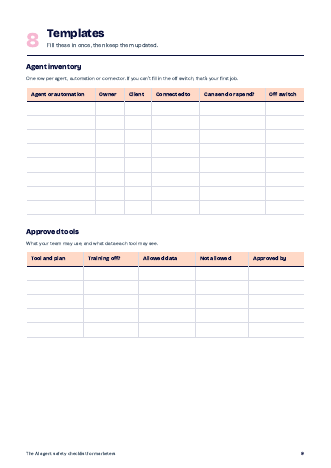
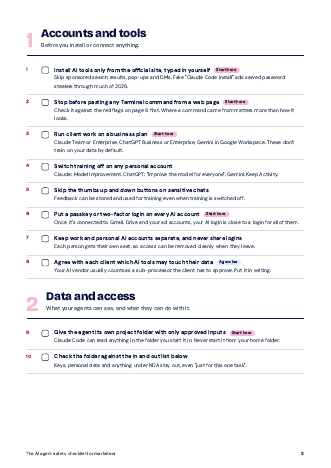
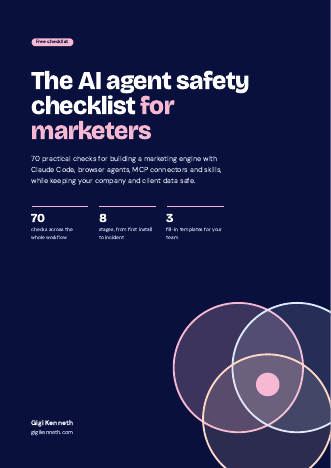
None of this means slowing down. Most of these tips take a few minutes to set up once, and they mean a mistake or an attack stays small. If you're just getting started with agents, my posts on AI agents in content marketing and responsible AI practices for product managers are good next reads.