After migrating off Wix, run a free site audit. Here is what mine caught.
When I moved my site off Wix, the migration itself went smoothly. The thing I did not expect was everything Wix had been quietly handling in the background. Meta tags, a sitemap, canonical URLs, image compression, redirects: all of it was baked into the platform, invisible, done for me. The moment I owned my own stack, all of that became my job, and I had no idea which parts were now broken.
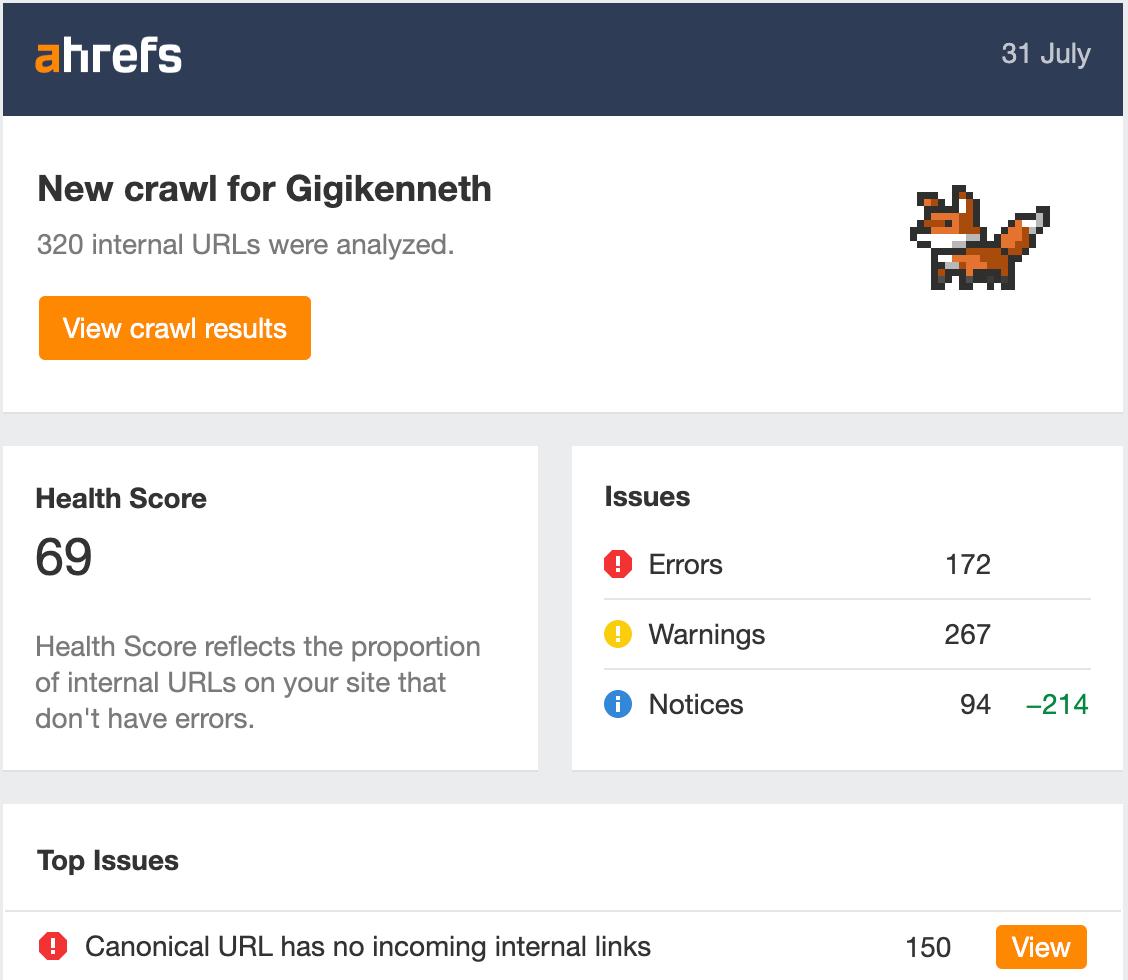
The answer, if you are in the same spot, is simple: run a full site audit before you assume everything is fine. A free one. I used Ahrefs, whose Site Audit works on the free Webmaster Tools tier, pointed it at my new site, and let it crawl. It came back with a health score of 69 and a long list of things Wix used to take care of. A couple of hours of fixes later it was 99. This is what it found, what I changed, and why each change was worth making.
Why a migration needs an audit, especially off Wix
Website builders like Wix trade control for convenience. Part of that convenience is a pile of SEO housekeeping you never see: it generates your sitemap, writes canonical tags, compresses your images, keeps your meta tags valid, and quietly redirects old URLs. You do not think about any of it because you never had to.
When you rebuild on your own stack, those responsibilities move to you and your tools. Some you will have set up correctly. Some you will have missed. And you will not know which is which by looking at the site, because a broken canonical tag or a missing meta description is invisible to a human visitor. It is only visible to a crawler. So you need a crawler.
Running the audit (on the free tier)
Ahrefs Webmaster Tools is free, and it includes Site Audit. You verify you own the site, add it as a project, and run a crawl. A few minutes later you get a health score, which is the single number worth watching, and a categorised list of issues.
One thing to understand about that score, because it changes how you read the list: the health score is the percentage of your pages that have no error-level issue. Warnings and notices, like a meta description being a little short, do not move it. Only errors do. That matters later.
My first crawl: 69, and 156 pages carrying an error. Here is what was in there.
What it found, and what I changed
Broken links
Three internal links pointed at pages that no longer existed, including one leftover from my old Wix URL structure. Broken links frustrate visitors and waste the crawl budget search engines spend on your site. I corrected two links and added a redirect for the stale Wix one. Benefit: no more dead ends for readers or crawlers.
Meta titles and descriptions
Wix had been filling these in. My new templates were leaning on thin fallback text, and some pages had none worth showing. I rewrote the fallbacks so every page produces a proper, answer-first description, and trimmed the few that ran too long. Benefit: better, more accurate snippets in search results, and, increasingly, better text for AI tools to quote.
Missing alt text
The audit flagged 274 images with no alt text. That looked enormous until I saw the pattern: they were nearly all rendered by a handful of shared components, a blog card, an image marquee, the lightbox, each missing its alt, repeated across every page they appeared on. I fixed the components, not the pages. Benefit: the site is now usable with a screen reader, and search engines can understand what the images show.
Orphan pages
A couple of pages had no links pointing to them at all, which makes them nearly invisible to search engines. I added the missing internal links, and marked a couple of genuinely private pages as "do not index" on purpose. Benefit: the pages I want found are now reachable; the ones I do not are cleanly excluded.
Oversized images
Wix compresses your images on upload. My new stack did not, so I had 67 images over half a megabyte, some of them three times wider than they would ever display. A short script capped their width and re-compressed them, and my total image weight dropped from 80MB to 22MB with no visible difference. Benefit: faster pages, which is good for both visitors and rankings.
The one that moved the score
All of the above took the score from 69 to 75. Worthwhile improvements, small movement, because most of them were warnings and notices, not errors. The error sitting on 150 pages was this: "Canonical URL has no incoming internal links."
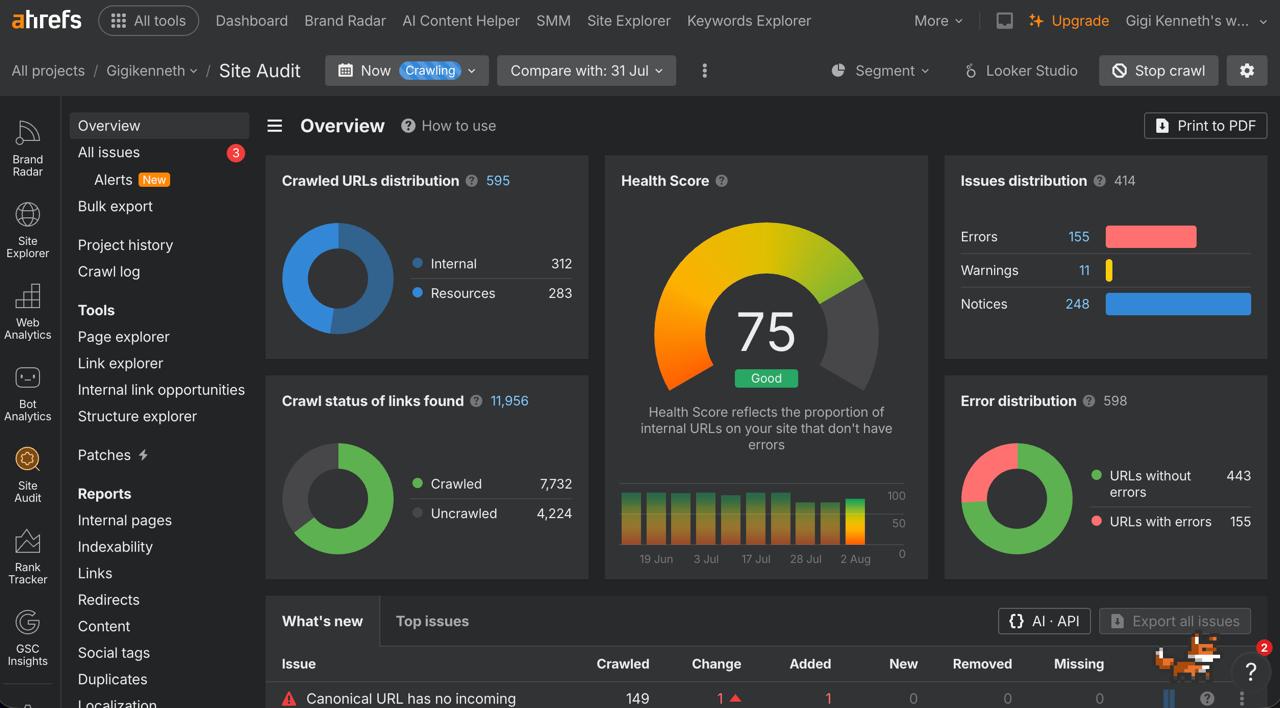
A canonical tag tells search engines the official address of a page. Mine were written with a trailing slash, like /blog/my-post/, but every link on the site was written without one, like /blog/my-post. To a crawler those are two different addresses, so it saw every canonical as a page nothing linked to. On almost every page. That single mismatch, invisible to me and to any visitor, was holding the whole score down.
The fix was to make everything agree: I stripped the trailing slash from the canonical tags, the sharing URLs, and the sitemap, so they matched the links. Two small edits. Benefit, and the result: the next crawl came back at 99.
The results
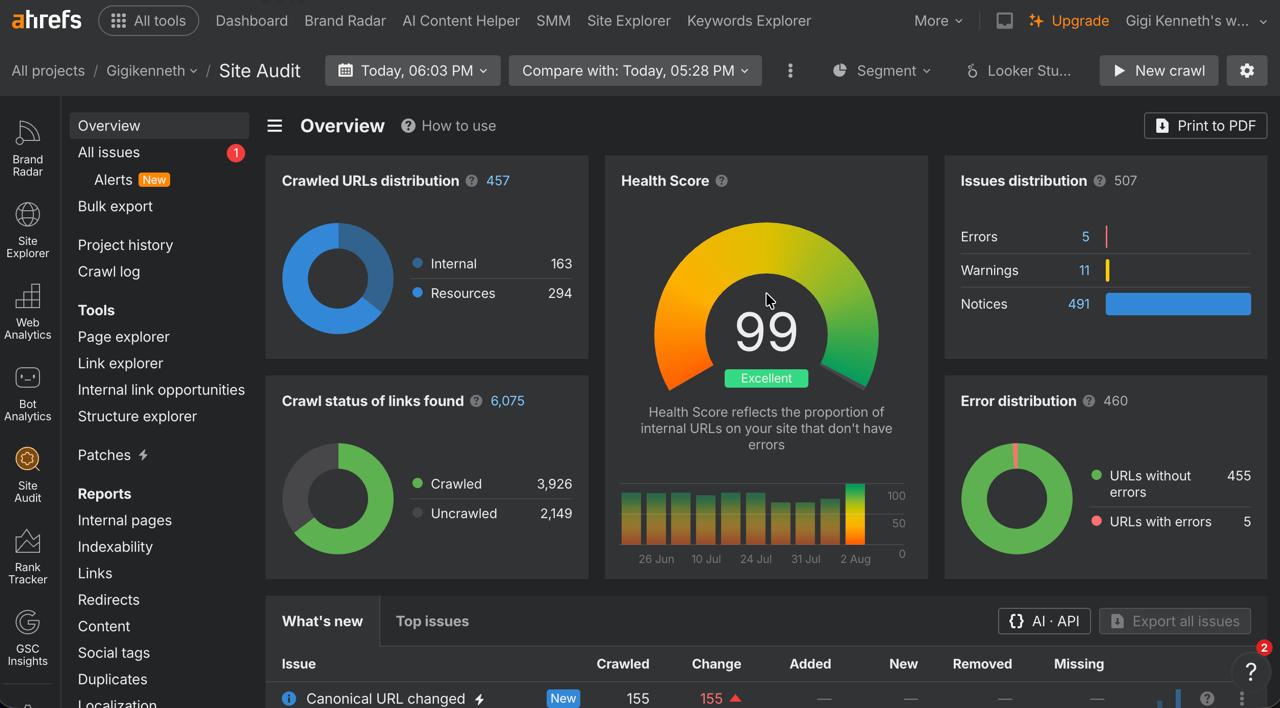
The score went from 69 to 99, and the number of pages carrying an error dropped from 156 to 5 (the five that remain are intentional, like private pages I deliberately keep out of search).
More concretely: no broken links, valid and useful meta tags on every page, alt text throughout, no orphaned pages, images a quarter of their old weight, and a canonical setup that search engines trust.
None of it was the migration's fault. It was simply the housekeeping Wix used to do, now waiting to be picked up. The audit is what told me where to look.
A bonus: are you showing up in AI answers?
While I had the hood open, I set up a small GEO check, because search is no longer the only place people ask questions. GEO, generative engine optimisation, is about whether AI tools cite you.
There is no good free tool for this yet, so I made a spreadsheet: the questions I want to be found for, run through Perplexity and Google's AI Overviews, logging whether my site was cited. Early read: my name returns me accurately on both, and one distinctive post already gets cited. The generic, competitive queries do not cite me yet, which is a content and reputation problem rather than a technical one. Worth starting to track now, because you cannot improve what you are not watching.
If you have just migrated
- Run a full site audit before assuming anything is fine. Ahrefs' free tier is enough to start.
- Read the errors first. They are what move the health score; warnings are worth fixing but will not shift the number.
- When one problem hits many pages, look for the shared component or template, not the individual pages.
- Watch out for trailing slashes. Keep your canonical tags, sharing URLs, sitemap, and internal links on one consistent convention.
- Start a GEO log, even a manual one, so you know whether AI tools are citing you.
Leaving Wix was the right call for me. But the smoothest migration in the world still leaves you holding the housekeeping the old platform did in the dark. An hour with a free audit tool is how you find it, and it is a genuinely satisfying hour when the score goes green.