I Built an AI Workflow on AirOps to Fix Asele's Invisible Content Problem, Here's Exactly How It Works
There's a specific kind of frustration that comes from publishing content you're proud of and watching it get ignored. Not by Google. Not by your audience. By AI.
I'm the founder of Asele, a women's health and cycle tracking app built for African women. We publish content about cycle syncing, hormonal nutrition, and productivity across the menstrual cycle. Good content. Science-backed content. Content that should, in theory, show up when a woman asks ChatGPT "how should I eat during my luteal phase" or asks Perplexity "what is cycle syncing."
It didn't. Zero citations. Every page, every platform.
That's what sent me down the rabbit hole of AEO and eventually to building an automated workflow inside AirOps that diagnoses why a page isn't being cited by AI, recommends specific fixes, rewrites the content, and tracks whether it's working over time. All monthly. All automated.
This post walks through exactly how I built it, why each step connects to the next, and what the whole thing is actually doing under the hood. I recently completed the Intermediate Content Engineering course with AirOps. This is a walkthrough of what I demoed.
First: What's the Difference Between SEO and AEO?
If you're new to AEO, here's the simplest way I can explain the difference.
**SEO (Search Engine Optimization) **is about getting Google to rank your page. You write content, get backlinks, use the right keywords, and hope you land on page one. The goal is to appear in a list of links.
AEO (Answer Engine Optimization) is different. When someone asks ChatGPT or Perplexity a question, those platforms don't return a list of links, they generate a direct answer. Sometimes they cite sources. Sometimes they don't. AEO is about making your content the source they cite.
The structural requirements are different. Google cares about domain authority, backlinks, and keyword density. AI models care about whether your content directly answers a question, whether it's structured in a way they can extract cleanly, and whether it's specific enough to be trustworthy. A page can rank well on Google and still have zero AI citations, which is exactly what was happening to Asele.
The Workflow Overview
Before I walk through each step, here's the full picture:
Input: Article URL + Brand Kit
        ↓
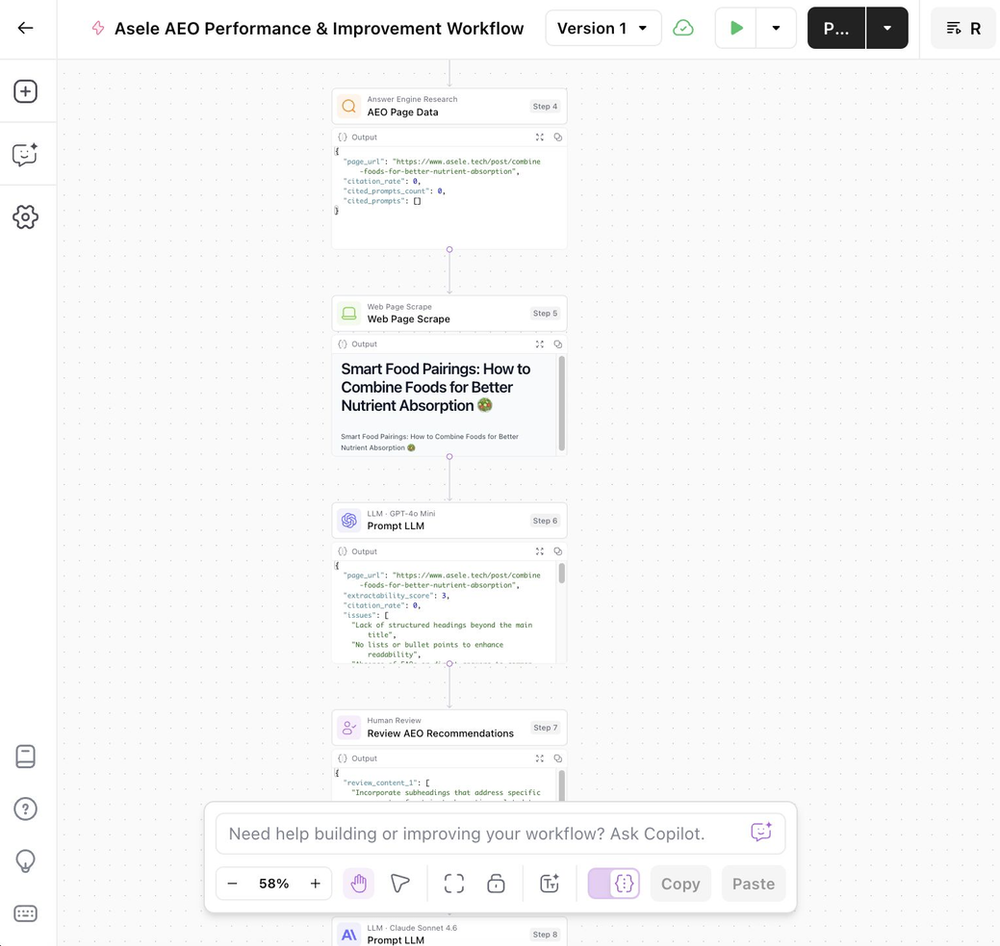
Step 1: AEO Page Data, what's the current citation rate?
        ↓
Step 2: Web Page Scrape, what does the page actually say?
        ↓
Step 3: Analysis LLM, what's broken and how do we fix it?
        ↓
Step 4: Human Review, which fixes do I actually want?
        ↓
Step 5: Rewrite LLM, apply the approved fixes in Asele's voice
        ↓
Step 6: Content Comparison, show me exactly what changed
        ↓
Output: Everything saves to a grid for monthly tracking
Seven steps. Each one feeds the next. The whole thing runs monthly on a schedule, pauses for my approval in the middle, and writes results to a grid I can track over time.
Think of it like a monthly health check for your content, except instead of checking your blood pressure, it's checking your AI citation rate.
Step 1: AEO Page Data, The Diagnostic
The first thing the workflow does is pull real citation data for the page you're analysing.
In AirOps, there's a native step called AEO Page Data. You give it a URL and a Brand Kit, and it returns:
- Citation rate, what percentage of relevant AI queries cite this page
- Cited prompts count, how many specific questions triggered a citation
- Cited prompts, the exact questions where your page showed up (or didn't)
- Platform breakdown, which AI platforms (ChatGPT, Perplexity, Gemini, Google AI Overview) are citing you
For Asele, every single page came back with citation_rate: 0. Not low. Zero.
This is your baseline. You can't know whether your changes are working unless you know where you started. Every time the workflow runs monthly, this step captures the current state, so over time, you build a record of whether the citation rate is actually moving.
The AEO Page Data step is connected to two inputs: the Article URL (the page you want to analyse) and the Brand Kit (which tells AirOps which brand's citation data to pull). These inputs feed every downstream step, which is why getting them right matters.
Step 2: Web Page Scrape, Reading the Patient
Once we know the citation rate, we need to understand why. To do that, the workflow needs to actually read the page.
The Web Page Scrape step takes the same Article URL input and fetches the full page content, headings, body text, structure, everything. Because Asele's site is built on Wix (which renders content dynamically via JavaScript), I enabled JavaScript rendering in the scraper settings. Without that, the scraper returns empty HTML.
Think of this step like a doctor running tests before making a diagnosis. The AEO Page Data step told us the patient has a problem (zero citations). The Web Page Scrape step reads the patient's chart so we can figure out what's causing it.
The scraped content feeds directly into the next step, the analysis LLM. This is the core connection in the workflow: citation data tells us that there's a problem, page content tells us why.
Step 3: Analysis LLM, The Diagnosis
This is where the workflow starts making decisions.
A Prompt LLM step receives both the scraped page content (from Step 2) and the AEO citation data (from Step 1) and runs them through a structured analysis prompt. The key thing here, and this comes directly from what AirOps teaches in their content engineering programme, is that the output needs to be JSON, not prose.
Here's why that matters. If the analysis step returns a paragraph like "this page could benefit from better structure and more FAQ content," that's useful for a human to read but useless for the workflow to act on.
The next step can't branch based on a paragraph. It can't extract specific issues as checkboxes. It can't write a citation rate to a grid column.
JSON fixes this. The analysis step returns a structured object like:
{
  "extractability_score": 7,
  "citation_rate": 0,
  "issues": [
    "Lack of structured FAQ section",
    "Limited use of bullet points for key takeaways",
    "No clear headings for subsections under main topics"
  ],
  "aeo_recommendations": [
    "Add a dedicated FAQ section addressing common questions about nutrient absorption and women's health",
    "Use bullet points or numbered lists to summarise key food pairings and their benefits",
    "Include clear subheadings for each nutrient pairing to improve content organisation"
  ],
  "improvement_priority": "high",
  "score_explanation": "The page has a reasonable H1 and some body content but lacks the structural signals AI models use to extract and cite information reliably."
}
Every field in that object is addressable by the steps downstream. The issues array becomes a checkbox list in the Human Review step. The extractability_score could power a conditional branch.
The improvement_priority writes to a grid column. This is the pattern: when the next consumer is a human, use markdown. When the next consumer is the workflow itself, use JSON.
The analysis prompt is also where I hardcoded Asele-specific context, the topics that matter most for our citation goals (cycle syncing, hormonal nutrition, women's productivity, preventive care for African women).
This means the recommendations aren't generic "add more headers" advice. They're specific to what Asele needs to get cited for.
I use a mid-tier model (GPT-4o Mini) at low temperature (0.3) for this step. It's a classification and counting task, I don't need creativity, I need accuracy. Saving the heavier models for the rewrite step is both cheaper and more reliable.
Step 4: Human Review, The Guardrail
This step exists because AI analysis isn't always right.
The workflow could theoretically go straight from analysis to rewrite, diagnosis to treatment, no human in the loop. But that would be a mistake. The analysis LLM might recommend rewriting the intro paragraph, and I might know that intro is specifically written to rank for a particular keyword. The LLM doesn't know that. I do.
The Human Review step pauses the workflow and presents the aeo_recommendations array as a checkbox list. Each recommendation becomes a selectable item. I tick the ones I want applied, untick the ones I don't, and click Accept. Only the approved recommendations continue downstream.
This is the connection that's easy to miss: the Human Review step isn't just a safety feature. It's what makes the rewrite step trustworthy. Without it, you're applying every recommendation the LLM suggests, including the ones that would break your SEO. With it, you're in control of exactly what changes.
I also set up a Slack notification so the workflow pings me when it's waiting for review. Since this runs on a monthly schedule, I'd otherwise forget it's paused.
Step 5: Rewrite LLM, The Treatment
Once I've approved the recommendations, the rewrite LLM applies them to the original page content.
This step uses a stronger model, Claude Sonnet 4.6 at higher temperature (0.7). The analysis step needed accuracy. This step needs creativity and voice. It's the difference between a doctor diagnosing a problem and a physiotherapist designing your recovery programme. Different skill, different approach.
The system prompt does two things. First, it gives the model Asele's brand voice, warm, science-backed, culturally grounded, community-focused, written for African women navigating health and productivity. Second, it sets hard constraints: do not change the H1, do not remove anchor text, do not touch the keyword-dense intro paragraph.
These constraints are what preserve the SEO signals while improving the AEO ones.
The user prompt feeds in the original scraped content (from Step 2) and loops through only the approved recommendations from the Human Review step:
APPROVED RECOMMENDATIONS TO APPLY: {% for item in step_7.output.review_content_1 %}
{{ item }}{% endfor %}
That Liquid loop is important. It means the rewrite step only applies what I approved, not the full list from the analysis, not a hardcoded set of instructions.
The Human Review step and the Rewrite LLM step are directly coupled through that variable reference.
Step 6: Content Comparison, The Evidence
After the rewrite, the workflow runs a Content Comparison step. It takes the original scraped content (Step 2) and the rewritten content (Step 5) and produces a highlighted diff, additions, removals, and rewrites all marked in purple.
This step exists for two reasons. The practical one: I need to verify the rewrite made the right changes before I publish anything. The strategic one: for demo day and for tracking purposes, I need to show evidence that something actually changed.
Think of it like a before-and-after photo. The citation rate is the outcome metric. The content comparison is the proof of what we did to try to move it.
How It All Connects to the Grid
Every output from the workflow writes to a grid, essentially a spreadsheet inside AirOps, where each row is a page and each column is a metric.
| Page URL | Citation Rate | Extractability Score | Issues | Priority | Rewritten Content | Comparison |
|---|---|---|---|---|---|---|
| /about | 0% | 7 | FAQ missing... | High | [new content] | [diff] |
| /cycle-101 | 0% | 6 | No H2s... | High | [new content] | [diff] |
The grid is what makes this a tracking system rather than a one-off fix. Every month the workflow runs, adds a new row, and I can see whether the citation rate on /cycle-101 went from 0% to 3% to 7% over three months. Without the grid, I'd be guessing.
What I Learned Building This
A few things worth noting if you're thinking of building something similar:
Zero citations isn't a content quality problem. Asele's blog posts are well-researched and genuinely useful. The problem was structural, no FAQ sections, prose-heavy content without clear extractable answers, and missing subheadings. AI models aren't reading for enjoyment. They're scanning for extractable facts.
JSON output in the analysis step unlocks everything downstream. This is the architectural
decision that makes the whole workflow functional rather than just interesting. If you take one thing from this post, it's that.
Human review is worth the friction. I considered removing it to make the workflow fully automated. I'm glad I didn't. There have already been recommendations I'd have rejected, and they would have quietly broken SEO signals I spent months building.
AEO and SEO aren't in conflict if you're deliberate about it. The constraints in the rewrite prompt, don't touch the H1, preserve anchor text, keep the keyword-dense intro, mean I can improve AI extractability without undoing Google rankings. Both can move in the right direction simultaneously.
What's Next
The workflow currently runs on individual URLs. The next version will pull from Asele's sitemap automatically and process every page in parallel, so the monthly report covers the full site, not just the pages I remember to check.
I'm also planning to add a competitor citation step: pulling AEO data for Flo and Clue on the same prompts Asele should be ranking for, so the analysis LLM can factor in not just where Asele is underperforming but where competitors are winning.
If you're building in femtech, health tech, or any space where women are searching for answers, this is worth paying attention to. The shift from keyword search to AI-generated answers is already happening.
The brands that get cited are going to have a structural advantage that compounds over time.
Resources
- AirOps, the platform I built this workflow on
- AirOps: Why Ranking on Page One Isn't Enough, the research report behind the extractability scoring approach
- AirOps: The 2026 State of AI Search, useful context on how AI citation behaviour is changing
- Asele, the app this workflow is built for
- Blush & Bloom Podcast, where we talk about women's health, career, and the stuff nobody tells you
- My writing on AI and health tech, more posts like this one